Rock Paper Scissor with C# | C# Tutorials
Creating a program like this enhances using much functionality in C# language.
Pre-requisite
To perform the programs the Visual studio will be used as an integrated development environment. Simply open up the Visual Studio and click on CREATE A NEW PROJECT then select Console App (.Net Core). Name the project then click on Create.
Method
While making this program we will follow a workflow which will be like:
- - Accepting user input.
- - Generating random output.
- - Comparing the choices.
- - Declaring the winner.
Since it is a rock paper and scissor game, it requires input from the user in order to generate some end result.
The working of this program will have several functions and methods. Once it gets the input from the user it will compare the input with the input generated by the system. This system generated input will be random so that out of the rock, paper, and scissor it can give any one of them. Once it gets both the inputs, it will do the conditional rendering. The conditional rendering will provide the basis on which the winner is to be declared or no winner but draw.
Code
Mention a few variables, which will have user and system input as string data type and random number variable as an integer data type.
string userInput, systemInput;
int randomNum;
Get the user to give input to anyone between Rock, Paper, and Scissor. Get the value stored in the variable.
userInput = Console.ReadLine();
Create an object by new to generate random numbers. To set the range give some numbers as parameters so that it will generate random numbers between those numbers only.
Random rnd = new Random();
randomNum = rnd.Next(1, 4);
Next is doing a conditional rendering, for this, we can use the switch method with different cases. Each case will have one value already given to the system input.
What will happen is that a random number will be generated between 0 to 4. Let's say 2 and then it will be passed through the switch statement as a parameter and then it will check the case with the same number.
case 1:
systemInput = "Rock";
break;

case 2:
systemInput = "Paper";
break;
Then in each case, compare the user input with the system input and then show the result as well as the winner.
To do this, implement if statement to compare.
case 3:
systemInput = "Scissor";

Console.WriteLine("Computer chose Scissor");

if (userInput == "Rock"){
Console.WriteLine("You Win");
}else if (userInput == "Paper"){
Console.WriteLine("You Loose");
}else{
Console.WriteLine("It is a draw");
}
break;
NOTE: Make sure you put input with having in mind that this is case sensitive.
using System;

namespace Hello_World

{

class Program

{

        static void Main(string[] args)

        {

            string userInput, systemInput;

            int randomNum;


            Console.Write("Give an input from Rock/ Paper/ Scissor ");

            userInput = Console.ReadLine();


            Random rnd = new Random();

            randomNum = rnd.Next(1, 4);


            switch (randomNum)

            {

                case 1:

                    systemInput = "Rock";

                    Console.WriteLine("Computer chose Rock");

                    if (userInput == "Rock")

                    {

                        Console.WriteLine("It is a draw");

                    }else if(userInput == "Paper")

                    {

                        Console.WriteLine("You Loose");

                    }

                    else

                    {

                        Console.WriteLine("YOu win");

                    }

                    break;

                case 2:

                    systemInput = "Paper";

                    Console.WriteLine("Computer chose Paper");

                    if (userInput == "Rock")

                    {

                        Console.WriteLine("You Loose");

                    }

                    else if (userInput == "Paper")

                    {

                        Console.WriteLine("It is a draw");

                    }

                    else

                    {

                        Console.WriteLine("You win");

                    }

                    break;

                case 3:

                    systemInput = "Scissor";

                    Console.WriteLine("Computer chose Scissor");

                    if (userInput == "Rock")

                    {

                        Console.WriteLine("You Win");

                    }

                    else if (userInput == "Paper")

                    {

                        Console.WriteLine("You Loose");

                    }

                    else

                    {

                        Console.WriteLine("It is a draw");

                    }

                    break;

                default:

                    Console.WriteLine("invalid entry!");

                    break;

            }
        }
}
}
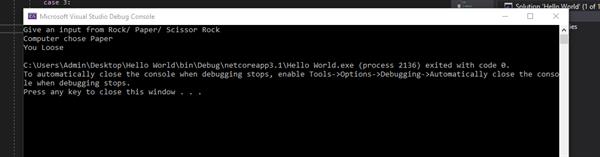
Output: